
ChatGPT for small business: what to hand it, and what to keep
By Vikas Reddy, Founder, Valior
The short answer
Use ChatGPT for first drafts, summaries and sorting. Keep the final word, anything about money, and anything a customer will read without you checking it. Set it up once for the whole team, with shared instructions, so it writes in your voice and doesn't start from zero every time.
That's most of it. The rest of this post is how.
Why it feels useless at first
You open it, type "write a marketing email", and get something that sounds like every other marketing email. You close the tab. A week later someone on your team tries it, gets the same thing, and decides AI isn't for your business.
The tool isn't the problem. It knows nothing about you. It doesn't know your customers, your prices, what you'd never say, or what happened with the last client. Give it that, and the drafts stop sounding generic.
What ChatGPT is good at in a small business
| Job | What you give it | What you get back |
|---|---|---|
| Replying to common emails | The email, plus your notes on how you usually answer | A draft in your tone, ready to edit |
| Meeting and call notes | A transcript or your rough notes | A summary with decisions and next steps |
| Quotes and proposals | Your scope notes and a past proposal | A first draft of the new one |
| Job ads and policies | What the role or rule needs to cover | A clean first version |
| Sorting a messy list | A pasted list of leads, tickets or feedback | Grouped, tagged and ranked |
| Social posts | One thing that happened this week | Three short versions to choose from |
Notice the pattern. Every job starts with something you already have and ends with something you check.
What to keep human
- Prices, refunds and anything with a dollar sign. One wrong number in a quote costs more than every hour you saved.
- Anything sent without you reading it. Drafts, yes. Auto-sent replies to customers, not from a chat window.
- Facts it can't see. It doesn't know your stock levels, your calendar or your order status unless something connects it. When it doesn't know, it can still sound sure.
- Hard conversations. A complaint from a long-time customer, a staff issue, a late payment from someone you like. Draft if it helps you think. Then write it yourself.
Set it up once, for the whole team
Most of the value comes from twenty minutes of setup that nobody does.
- Use a business plan, not personal free accounts. Business plans keep your team's chats out of model training by default and let you share setups across the team. Check the current terms on the plan you pick.
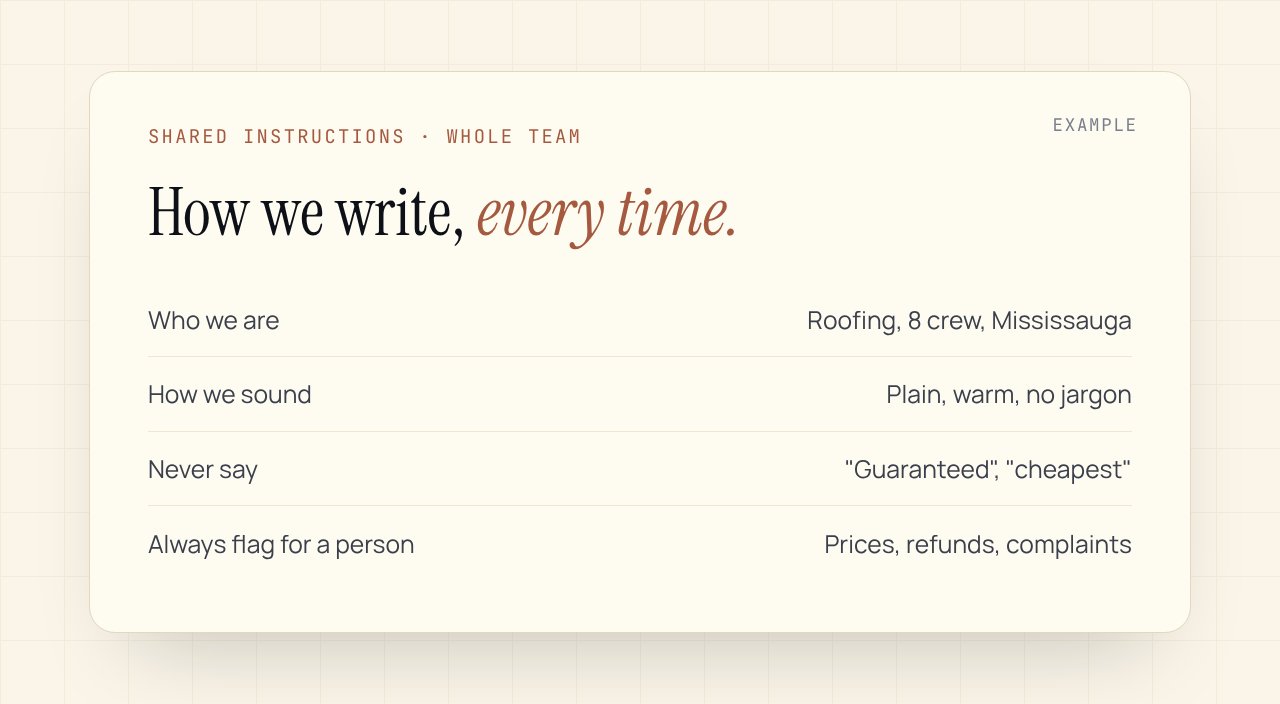
- Write shared instructions. One page: who you are, who your customers are, how you sound, words you never use, and what it must always flag for a human. Put it in a shared project or custom GPT so everyone starts from the same place.
- Save five prompts your team actually needs. Not fifty. The ones for your real weekly jobs.
- Decide the rule for customer data. What can go in, what never does. Write it down.
Five prompts to copy
- "Here is a customer email and my notes. Draft a reply in our voice. Keep it under 120 words. Flag anything you're unsure about instead of guessing."
- "Summarise these call notes into: what they want, what we promised, open questions, next step with a date."
- "Here's last month's proposal and new scope notes. Draft the new proposal. Keep our structure. Leave every price as [PRICE] for me to fill in."
- "Group this list of customer feedback into themes. Count each theme. Quote the clearest example of each."
- "Turn this short story from our week into three LinkedIn posts: one plain, one with a lesson, one as a question."
Where ChatGPT stops and workflows start
ChatGPT helps one person at a time, when they remember to open it. The bigger wins come when the drafting happens on its own. A new order, lead or invoice arrives, the draft is waiting in a queue, and someone approves it. That's the jump from using AI to running parts of the business on it.
Small business owners lose about a third of their week to admin work like this, according to a Forbes report on a survey of 251 US entrepreneurs. ChatGPT trims some of it. Connected workflows take back most of it.
One last thing
The teams that get the most out of ChatGPT aren't the most technical. They're the ones who wrote down how they work. That page of shared instructions does more than any prompt trick.
Want to see where the hours go in your business first? The free AI Readiness Scorecard takes four minutes and shows what your manual work costs you a year.
Related Playbook
Solo founder business OS: run the whole thing on autopilot
One connected system that handles your inbox triage, calendar, proposals, invoices, follow-ups, and weekly reporting so you can spend the day on the work that actually grows the business.
Read the playbookCommon questions
Is ChatGPT safe to use with customer data?+
Use a business plan, where chats are kept out of model training by default, and set a written rule for what customer data can go in. Payment details, passwords and anything sensitive should never be pasted into a chat.
Which ChatGPT plan should a small business use?+
A business plan for anyone using it for work, so chats stay out of training by default and you can share instructions across the team. Check current pricing and terms before you buy, since they change often.
Can ChatGPT reply to customers automatically?+
Not from a chat window, and we wouldn't let it send without a person checking. The safer setup is a workflow where AI drafts the reply and a person approves it before it goes out.
Want this set up in your business?
Free 30-min audit. We tell you straight what's worth automating and what isn't.
Grab the AI Automation Audit Checklist
A 12-point checklist to score your workflows before you spend a dollar on automation. Email-gated, no follow-up sequence.
Keep reading
One workflow, every two weeks
The trigger, the tools, the steps and the hours it saved. No roundups.